
Download LiveImage AI Avatar – Free AI Talking Avatar Maker, Video Generator
Intro & Overview
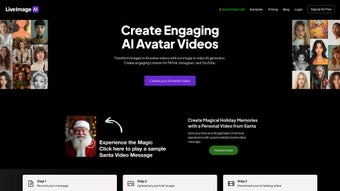
LiveImage AI Avatar is a cloud‑based web application that transforms any static portrait into a lifelike, talking AI video. Designed for creators, educators, marketers and small business owners, the tool eliminates the need for expensive motion‑capture rigs or professional animation studios. By uploading a clear image and either recording a short voice message or typing text for the built‑in text‑to‑speech engine, users receive a video where the avatar mimics natural facial expressions, lip‑syncs perfectly, and reproduces the speaker’s tone.
The workflow is deliberately simple: no software download, no steep learning curve, and no hidden fees for the basic version. Because the platform runs entirely in the browser, it works on Windows, macOS, Android and iOS devices, giving you the freedom to produce content from a desktop workstation or a mobile tablet. The generated videos can be exported as MP4 or GIF files, making them ready for immediate sharing on social media, embedding in presentations, or uploading to learning management systems.
While rendering speed depends on image resolution and server load, most videos are produced within 30 seconds to a minute, keeping the creation loop fast enough for real‑time campaigns. LiveImage AI Avatar’s unique selling point is its unlimited avatar library – you are not confined to a limited set of pre‑designed characters, which means every output can be truly personal and brand‑specific. Whether you are crafting a TikTok hook, a corporate explainer, or an interactive classroom lesson, this free‑to‑try solution provides a secure, scalable way to add a human touch to digital content without the usual production headaches.
Core Features That Differentiate LiveImage AI Avatar
- Unlimited Avatar Creation: Upload any high‑resolution portrait – personal photos, stock images or custom illustrations – and instantly generate a talking avatar.
- Natural Facial Animation: Deep‑learning models produce realistic eyebrow raises, eye blinks and mouth shapes that sync precisely with the recorded voice.
- Voice Mimicry & Multilingual TTS: Use your own voice recording for authenticity, or let the AI generate speech in English, Spanish, French, German or Mandarin.
- One‑Click Export Options: Download the final clip as 1080p MP4 or lightweight GIF, both optimized for quick upload to YouTube, Instagram Reels, LinkedIn or LMS platforms.
- Secure Cloud Processing: All uploads are encrypted in transit (TLS 1.3) and stored only temporarily; files are automatically purged after 24 hours, complying with GDPR and CCPA standards.
- Cross‑Platform Web Interface: No installation required; the responsive UI works on Chrome, Edge, Safari and Firefox across Windows, macOS, Android and iOS.
- Batch Generation (Pro Feature): Create multiple avatars simultaneously, ideal for campaigns that need dozens of personalized videos.
- Future‑Ready API Access: Developers will soon be able to embed avatar generation into their own applications via a RESTful API.
Together, these capabilities make LiveImage AI Avatar a powerful yet approachable tool. The unlimited avatar option removes creative constraints, letting you align each video with a specific brand identity or personal story. Realistic facial movements and accurate lip‑sync boost viewer engagement, while multilingual TTS expands reach into non‑English markets without hiring voice actors. Security‑first processing protects sensitive client images, a crucial factor for agencies handling confidential material. Finally, the browser‑based design sidesteps compatibility headaches, ensuring that whether you are on a Windows laptop in the office or an iPad on the train, you can generate high‑quality talking avatars with just a few clicks.
Installation & Usage – From First Click to Final Video
Step‑by‑Step Setup
- Visit the official site: Open liveimage.ai/avatar and click the prominent “Start Now” button.
- Create a free account: Register using an email address or sign in with Google/Apple. A verification email unlocks the free tier, which allows up to five videos per day.
- Upload your portrait: Drag‑and‑drop a JPEG, PNG or WEBP file (minimum 500 × 500 px recommended). The AI scans the image for facial landmarks and prepares a 3‑D mesh.
- Add audio: Choose “Record Voice” to capture a personal message, or select “Text‑to‑Speech” and type your script. The platform supports five major languages and offers a selection of natural‑sounding voice profiles.
- Fine‑tune settings (optional): Adjust expression intensity, video length (up to 60 seconds on the free plan), background color or enable a transparent PNG overlay for later compositing.
- Generate the avatar video: Click “Create Avatar Video.” The cloud‑based GPU server renders the clip, displaying a progress bar that usually completes within 30–45 seconds.
- Download or share: Once processing finishes, click “Download MP4” or “Download GIF.” You can also copy a shareable CDN link for instant embedding on websites or learning platforms.
Because all processing occurs on secure servers, there is no heavy client‑side load, and the interface remains responsive even on older devices. The dashboard includes a “History” tab where past projects can be re‑downloaded, edited or duplicated. If the output appears blurry, the system suggests uploading a higher‑resolution image or improving lighting to enhance landmark detection. Live support is available via live chat, and a detailed knowledge base addresses common issues such as audio lag, unsupported file formats, or occasional rendering delays during peak traffic. Power users can upgrade to the Pro plan for unlimited video length, priority rendering queues, batch generation and API access, all for a modest monthly fee.
Conclusion – Pros, Cons, Compatibility, FAQ & Call to Action
Supported Operating Systems
- Windows 10/11 – any modern browser (Chrome, Edge, Firefox)
- macOS 12 Monterey and later – Safari, Chrome, Firefox
- Android 9+ – Chrome Mobile, Firefox Mobile
- iOS 14+ – Safari, Chrome
Pros
- Unlimited avatar creation – any portrait works.
- Real‑time facial animation with accurate lip‑sync.
- Free tier available; no software download required.
- Secure cloud processing with automatic data deletion.
- Cross‑platform web interface works on all major OS.
- Multilingual TTS expands global reach.
Cons
- Free version limits video length to 60 seconds and 5 videos per day.
- Rendering speed can vary with server load and image quality.
- Batch generation and API access are locked behind the paid Pro plan.
Frequently Asked Questions
Can I use LiveImage AI Avatar for commercial projects?
Yes. The paid Pro plan includes a commercial license that permits unlimited use in marketing, advertising, and product demos. The free tier is limited to personal and non‑commercial use.
What image formats are supported?
JPEG, PNG and WEBP files are accepted. For optimal results, upload a high‑resolution portrait with a clear view of the face.
Is my data safe when I upload images?
All uploads are encrypted in transit (TLS 1.3) and stored temporarily on secure servers. Files are automatically deleted 24 hours after processing, meeting GDPR and CCPA requirements.
Can I edit the generated video after download?
Yes. The exported MP4 is fully editable in standard video editors such as Premiere Pro, Final Cut Pro or DaVinci Resolve, allowing you to trim, add subtitles or overlay additional graphics.
How does the pricing model work?
LiveImage AI Avatar offers a free tier with daily limits. The Pro subscription costs $19.99 USD per month and unlocks unlimited video length, batch generation, priority rendering and API access.
If you need a fast, secure and cost‑effective way to add a personal touch to your digital assets, LiveImage AI Avatar checks all the boxes. Its unlimited avatar library, realistic facial animation and multilingual speech synthesis provide a creative edge that many competitors lack. While the free tier’s daily caps may feel restrictive for high‑volume users, the affordable Pro plan scales smoothly for businesses and agencies. Rendering speed is generally quick, and the cloud‑first architecture ensures you can work from any device without worrying about compatibility. Whether you’re an educator creating engaging lessons, a marketer producing eye‑catching ads, or a hobbyist bringing family photos to life, this tool delivers tangible value.
Download LiveImage AI Avatar now and start turning ordinary portraits into talking avatars that boost engagement and set your brand apart.
LiveImage AI Avatar delivers on its promise of turning static images into engaging talking videos with impressive realism. The unlimited avatar capability and multilingual TTS make it a standout in a crowded AI video market. While the free tier’s daily limits may frustrate power users, the Pro plan is reasonably priced for businesses that need bulk production. Overall, it’s a reliable, secure, and creatively empowering tool for creators of all skill levels.



.png)



